
Leadmatically is built to help you move from scattered buying signals to a clean reply workflow without stitching together multiple tools.
This guide walks through the actual end-user setup flow in the /admin panel, from account creation to your first qualified lead.
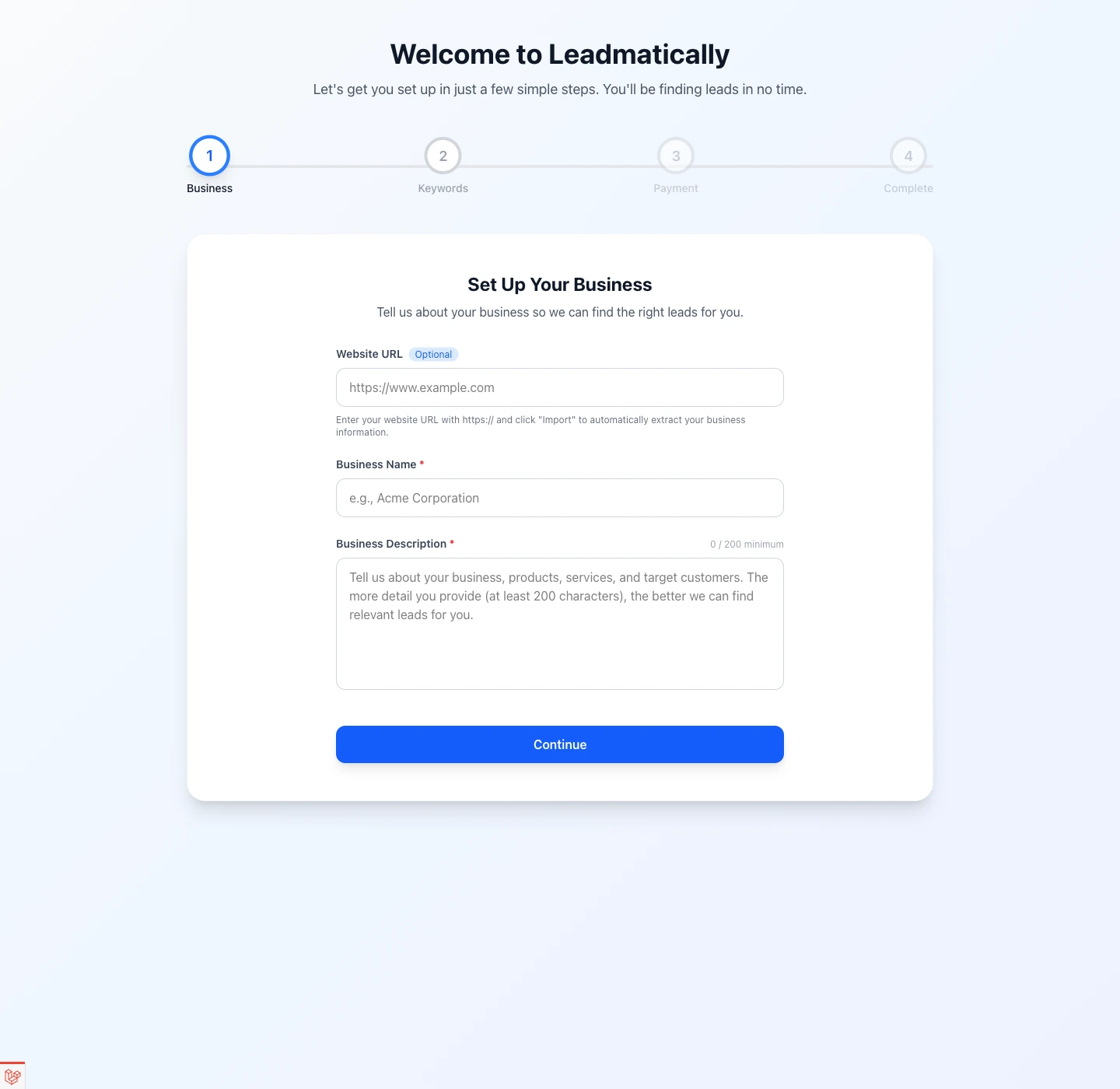
#What You Will Set Up
The first pass through Leadmatically is intentionally simple:
- Create your account and verify your email.
- Add your business details.
- Start with up to 3 onboarding keywords.
- Choose a plan.
- Land on the dashboard and review discovered leads.
- Open a lead, generate a reply draft, and track reply status.
#Capture Buying Signals
Leadmatically watches for relevant Reddit conversations so your team can spend more time responding and less time digging through threads.
- Reddit leads are tied back to the business they belong to.
- Filters help you focus on the conversations that still need action.
- The reply workflow keeps the original context and your draft side by side.
#Step 1: Create Your Account And Start Onboarding
After signing up at /admin/register, Leadmatically sends you into the onboarding wizard.
The onboarding flow has four steps:
- Business
- Keywords
- Payment
- Complete
On the first step, you can either type everything manually or start with your website URL.
- If you enter a website URL with
https://, the wizard can import business information for you. - Leadmatically attempts to pull your site content, generate a business name, and draft a stronger business description automatically.
- You can still edit everything before continuing.
To get the best results, make sure your description clearly explains:
- what you sell
- who it is for
- what outcomes customers want
- what makes your offer different
#Qualify Faster
Your business record is the foundation for everything else in the app. It determines how Leadmatically understands fit and what kinds of conversations should count as a lead.
Once onboarding is complete, you can manage all businesses from the Businesses section in the /admin panel.
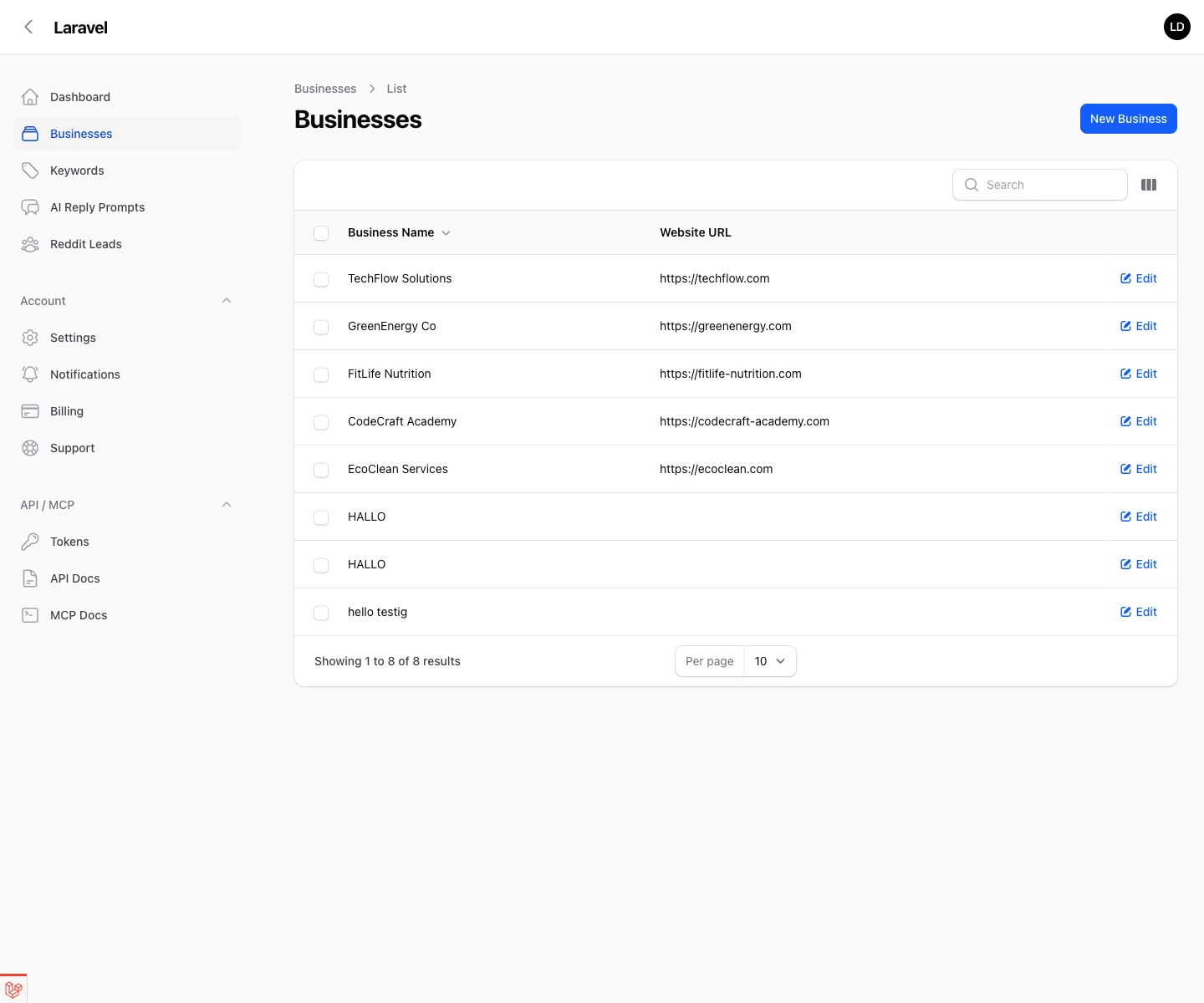
Inside each business record, you can:
- update the business name
- normalize and store the website URL
- refine the description
- adjust the AI score threshold
The AI score threshold controls how strict Leadmatically should be when deciding whether a conversation is relevant.
- Higher threshold: fewer leads, tighter fit
- Lower threshold: more leads, broader net
If you are just getting started, use a balanced threshold first, then tighten it once you see what kinds of leads are coming in.
#Step 2: Approve Your Starter Keywords
During onboarding, Leadmatically suggests up to 3 starter keywords from your business details.
That limit is intentional. The goal is to get you live quickly with a small, high-signal set instead of bloating the account with weak terms on day one.
Good onboarding keywords are:
- short
- specific
- tied to customer intent
- close to the language your buyers actually use
Examples of strong keyword patterns:
- problem phrases
- service phrases
- comparison phrases
- tool-replacement phrases
After onboarding, you can manage those terms from the Keywords section in the admin panel. There you can:
- review keywords by business
- toggle keywords active or inactive
- see how many leads each keyword has produced
This makes it easy to prune weak keywords and keep the list focused on terms that actually surface useful conversations.
#Step 3: Choose A Plan
The onboarding wizard moves next into plan selection.
This is where Leadmatically turns your setup into an active workflow. Your plan determines things like:
- daily discovered leads
- daily AI replies
- business limits
- keyword limits
If you already have an active subscription, onboarding recognizes it and lets you complete setup immediately.
Later on, you can return to Billing from the account menu to:
- review your subscription status
- see your current plan
- monitor daily quota usage
- subscribe, upgrade, or downgrade
#Reply With Context
Once onboarding is complete, the dashboard becomes your operating view.
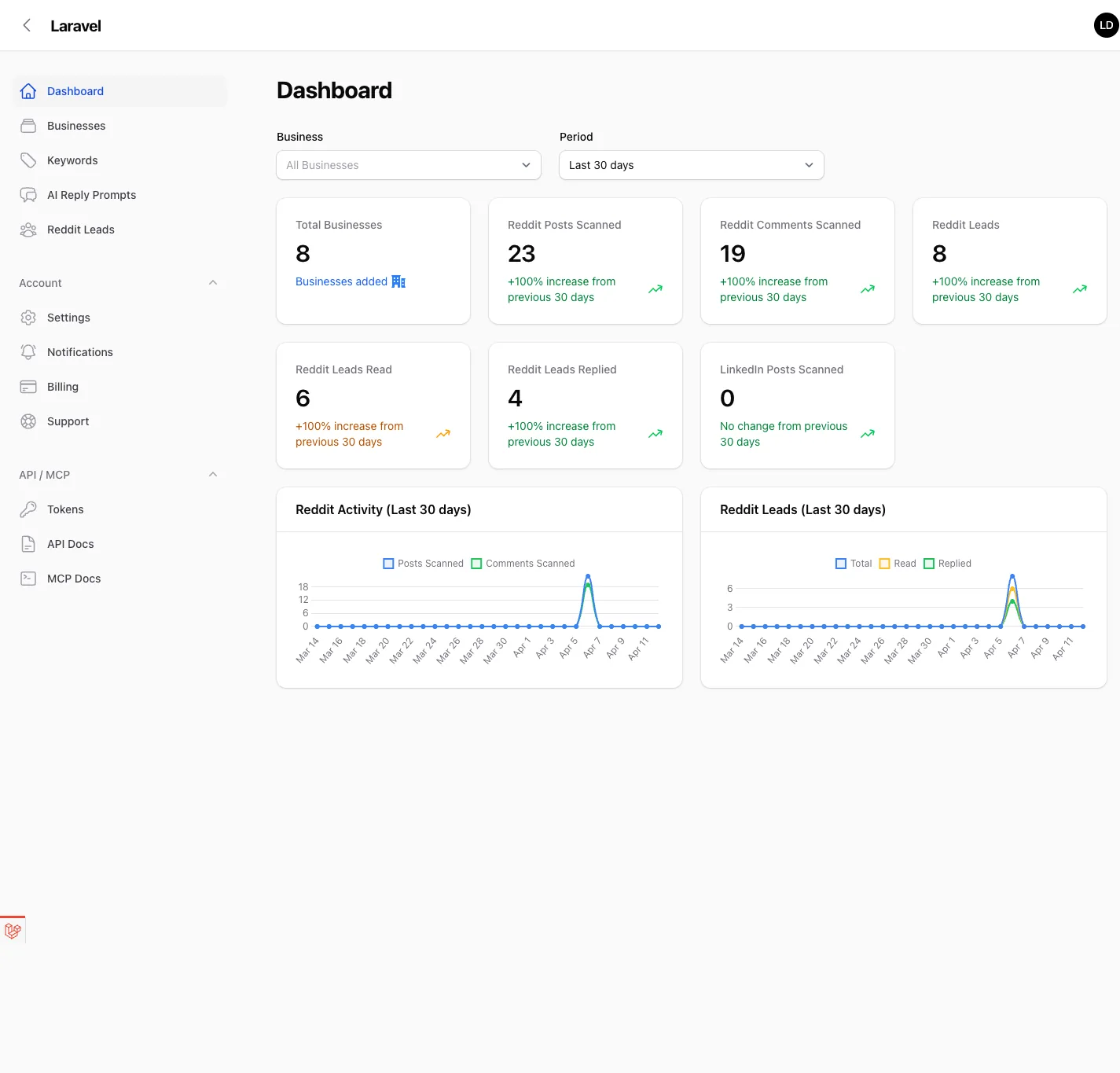
The dashboard gives you a quick read on:
- total businesses
- Reddit posts scanned
- Reddit comments scanned
- discovered Reddit leads
- how many leads were read
- how many were replied to
There are also filters for:
- business
- time period
This is useful when you want to focus on one business at a time or compare recent activity against a broader time range.
#Step 4: Open The Reddit Leads Queue
From the sidebar, open Reddit Leads.
This is usually the first place you will work once Leadmatically is live.
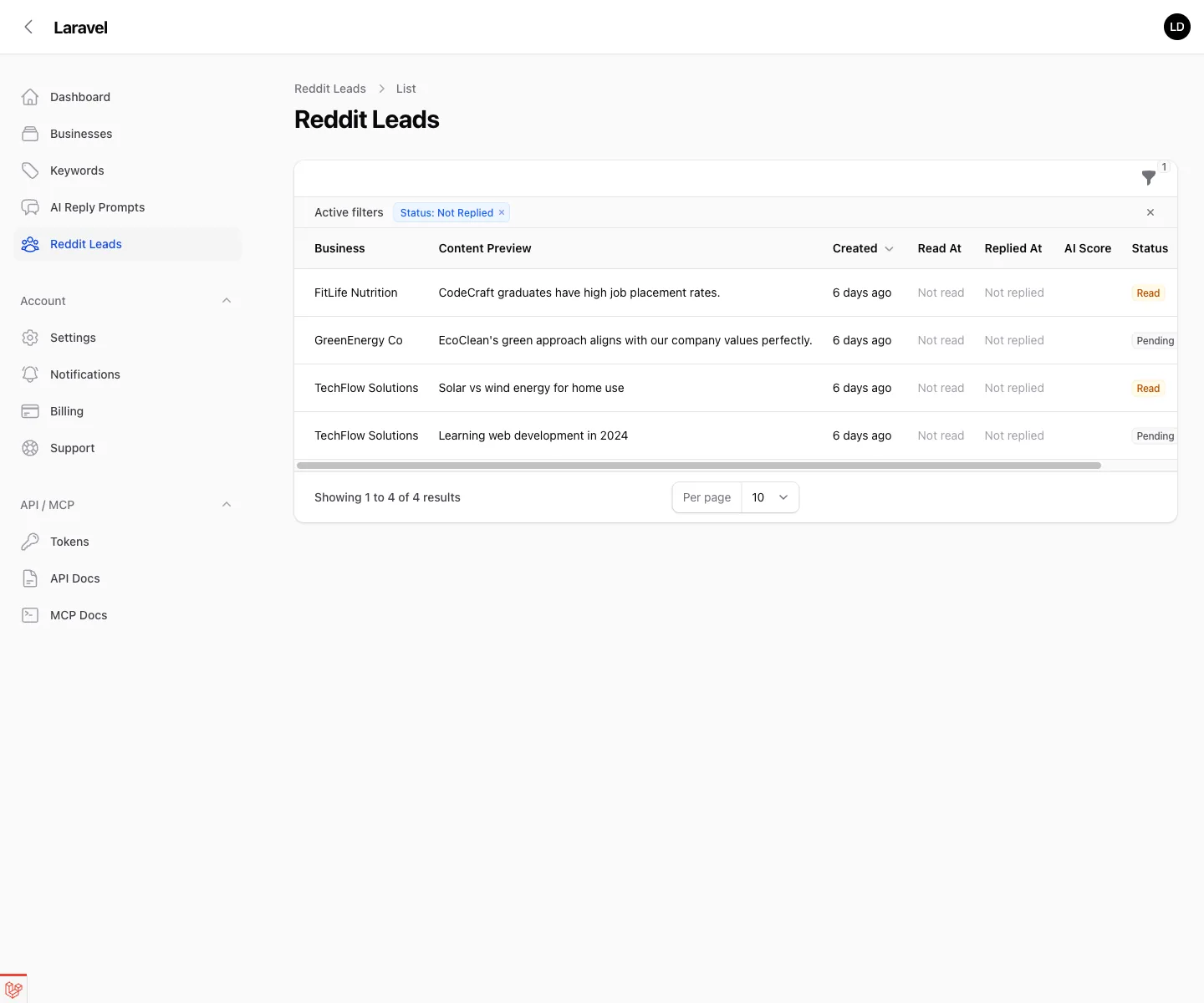
The list is already biased toward action:
- it supports business filtering
- it defaults to
Status: Not Replied - it shows AI score and lead status next to each conversation
That means you do not need to sort through every discovered item manually. Start with unreplied leads and review the highest-fit conversations first.
#Step 5: Work Your First Qualified Lead
Open a lead to see the full reply workflow.
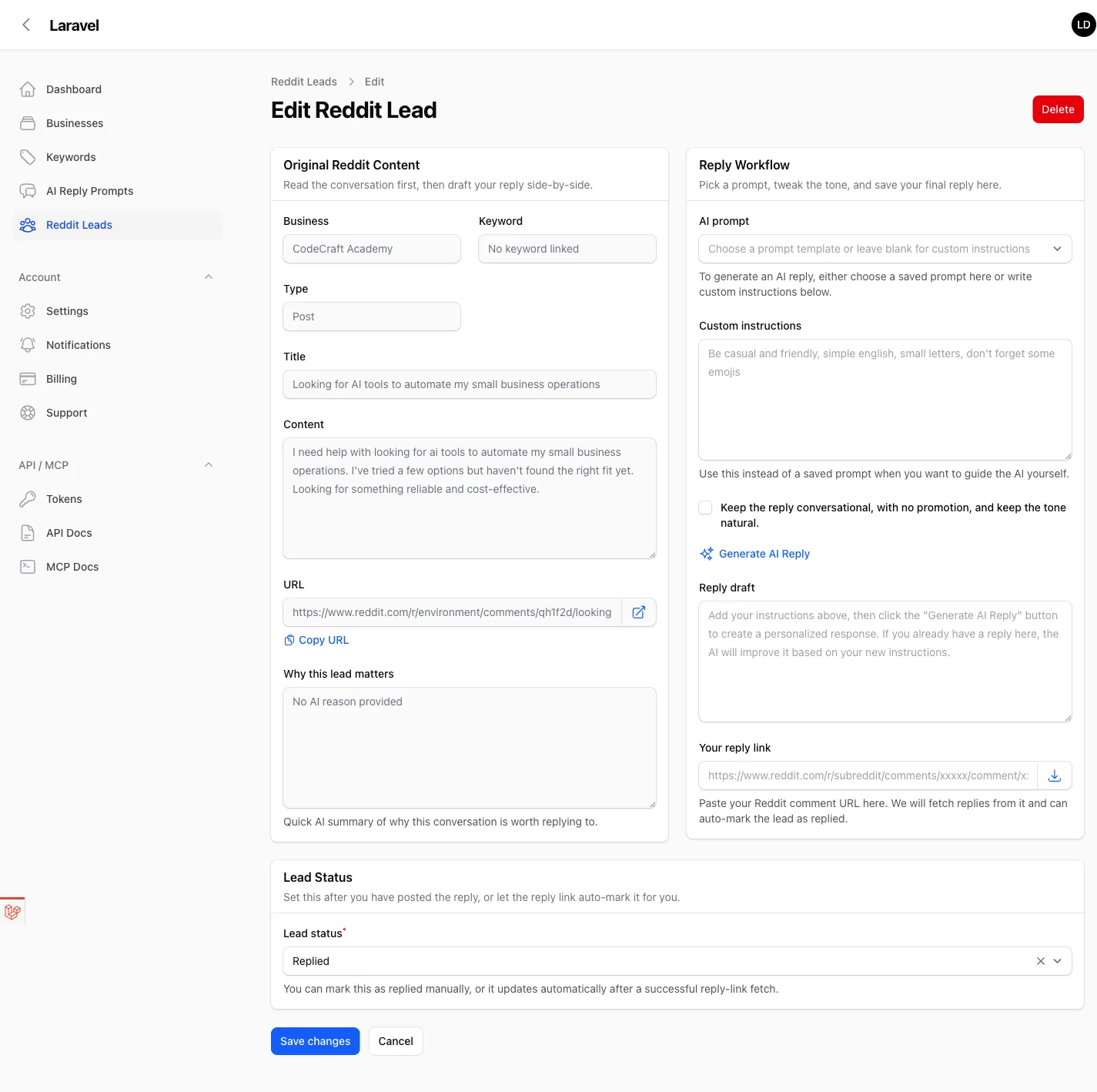
The lead detail page is split into three practical sections:
#Original Reddit Content
This section gives you the raw conversation context before you write anything:
- business
- linked keyword summary
- whether the lead came from a post or comment
- title and content
- source URL
- AI reason explaining why the lead matters
Start here every time. The reply quality is only as good as the context you absorb.
#Reply Workflow
This is where you draft the response.
You can:
- choose a saved AI prompt
- add custom instructions for tone and constraints
- keep the reply conversational and non-promotional
- generate an AI reply draft
- paste your real Reddit reply URL after publishing
If your team uses repeatable messaging patterns, create them in AI Reply Prompts first. That gives you reusable instruction sets without rewriting the same guidance for every lead.
#Lead Status
After you review or publish a reply, update the lead status.
Leadmatically supports a simple lifecycle:
- Pending
- Read
- Replied
If you paste the reply URL and fetch replies successfully, the record can be updated automatically. Otherwise, you can set the final status manually.
#Build a Repeatable Motion
The best Leadmatically setups are the ones that stay operationally boring.
That means:
- One clear business description per business.
- A small keyword list with high intent.
- Consistent review of the
Not Repliedqueue. - Prompt templates for your common reply styles.
- Regular checks of billing and quota usage.
- One queue for new opportunities.
- Clear ownership over who reviews and replies.
- Better visibility into whether the system is finding quality leads.
- Less context switching when you move from discovery to action.
#Recommended First-Day Checklist
If you want to go from zero to first qualified lead quickly, do this in order:
- Finish onboarding with a strong business description.
- Keep the initial 3 keywords narrow and specific.
- Pick a plan that gives you enough lead and reply capacity for testing.
- Open the dashboard and confirm data is flowing.
- Review the
Reddit Leadsqueue. - Open one strong lead and generate a first draft reply.
- Save the reply workflow you like into AI prompts for reuse.
That is the shortest path to getting real value from Leadmatically without overcomplicating the setup.